
AutoCount How-To
guide
AutoCount: SST: How does the system handle Tax-Exempted Services and Non-Taxable Services under the new SST-02 (Service Tax)?
AutoCount:SST-02(服务税)下免税服务与非应税服务的处理
Credential editorial desk
13 Nov 2026
3 min read

English article
Question
How does the system handle Tax-Exempted Services and Non-Taxable Services under the new SST-02 (Service Tax)?
Answer
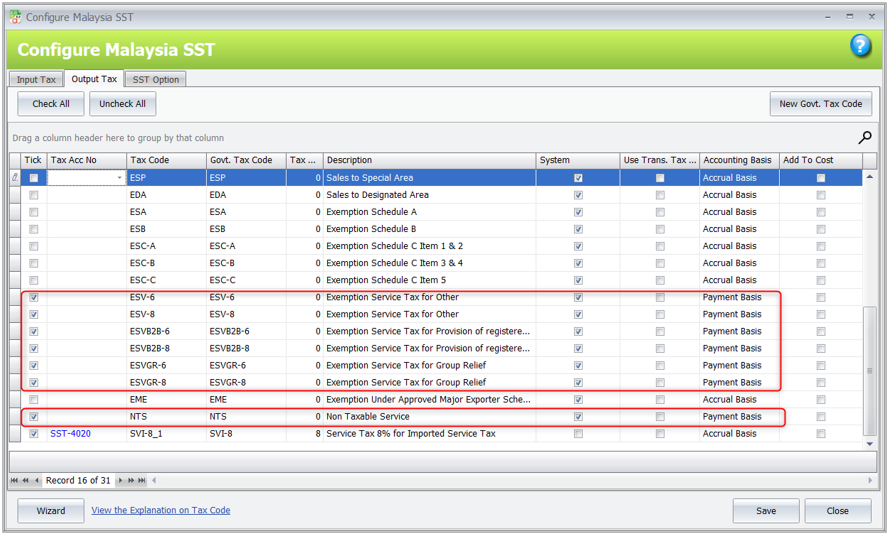
- Tax Exempted Services Tax Code
- ESV-6, ESV-8, ESVB2B-6, ESVB2B-8, ESVGR-6, ESVGR-8
- Non-Taxable Services Tax Code
- NTS
Accounting Basis (Payment Basis)
The accounting basis for Service Tax is Payment Basis, which means:
- The system will capture the SST amount only after the invoice is knocked off by payment or CN, within 12 months.
- If payment is not received within 12 months, the system will automatically calculate and recognize the SST tax.
Tax Exempted Services:
Example Scenario – ESV-6
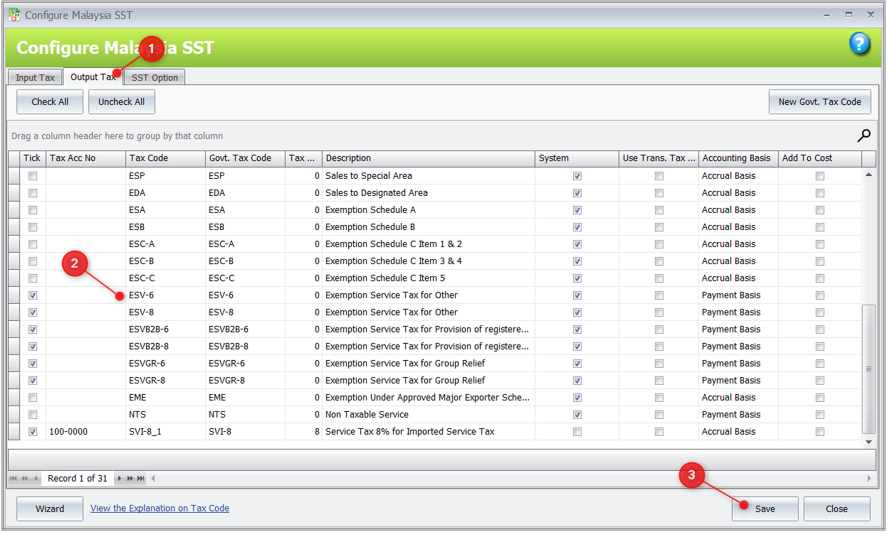
- Go to Tax > Tax Code Maintenance > Configure Malaysia SST > Output Tax. Select ESV-6, then click Save.
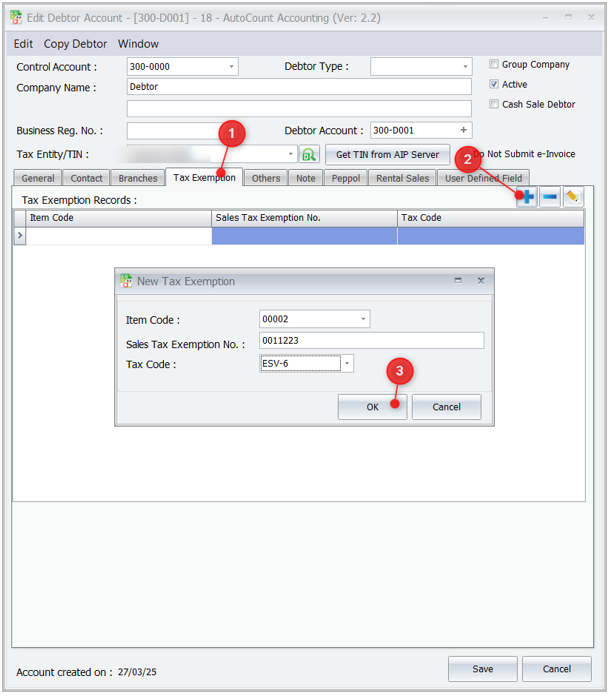
- Go to A/R > Debtor Maintenance. Edit the debtor, go to the Tax Exemption tab, add the Item Code and click Save.
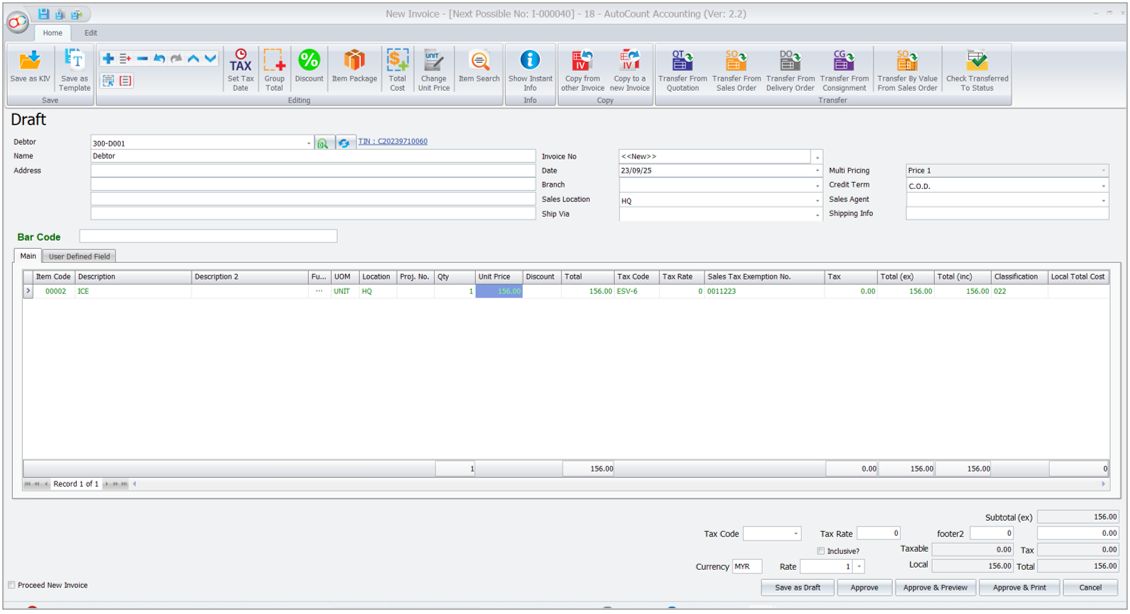
- Go to Sales > Invoice. Select the Debtor and Item Code. The system will automatically assign the related tax code.
- Click Approve & Preview or Save & Preview. Choose a report format starting with SST.
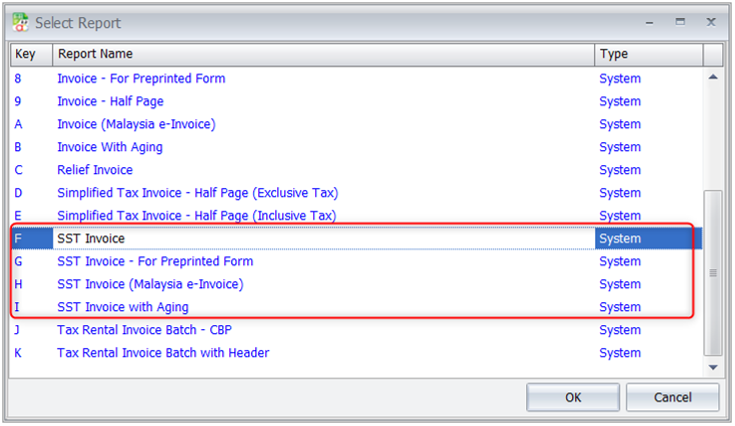
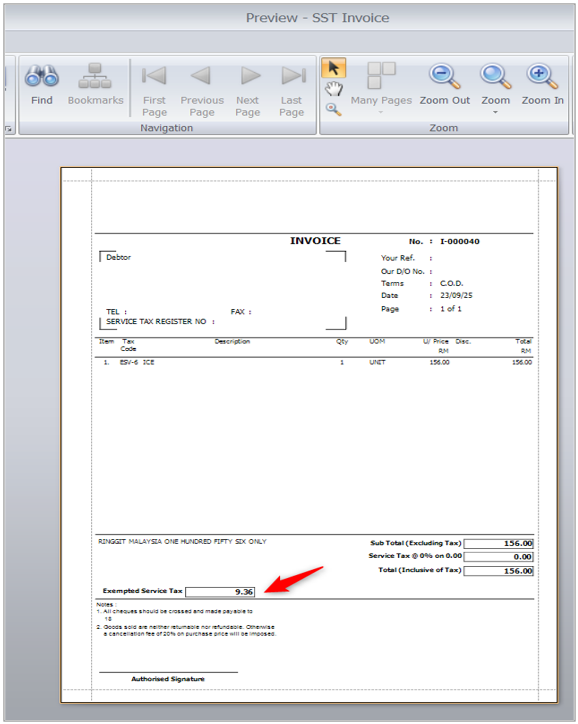
- The Exempted Service Tax Amount can be viewed in the SST Invoice Report.
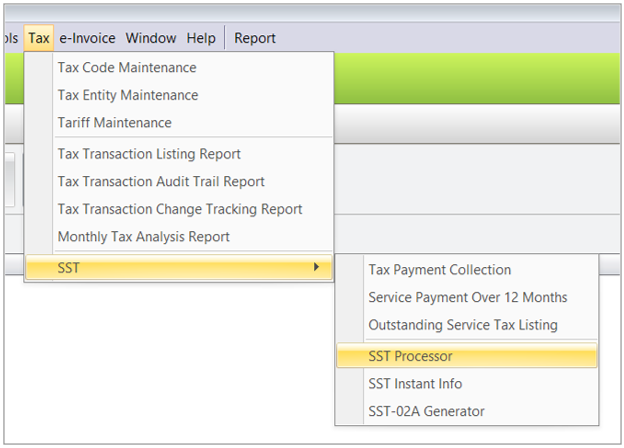
- After the invoice payment is made, run the SST Processor for that period via Tax > SST > SST Processor.
- The applied tax code (ESV-6) will appear in the SST Return.
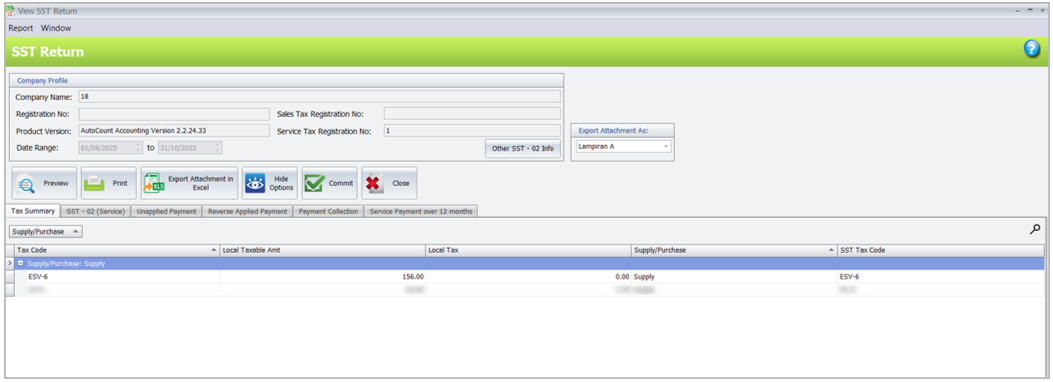
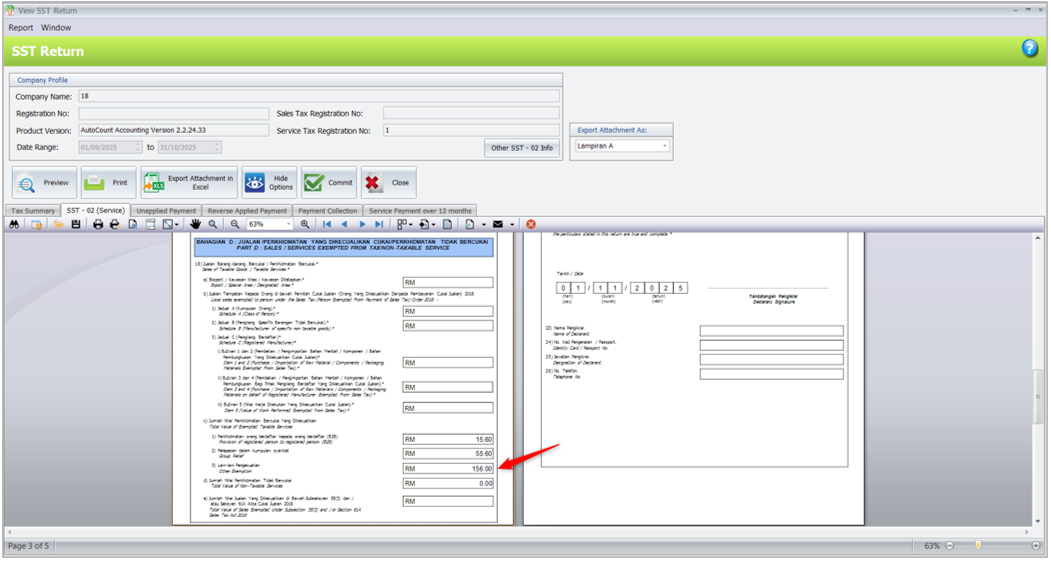
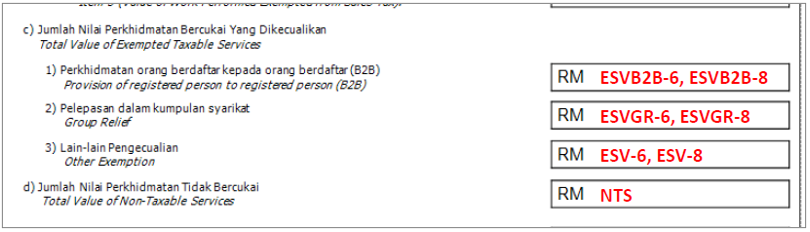
The exempted amount will be reflected in the SST Return as follows:
- Column 18,Part C, No.1
- ESVB2B-6, ESVB2B-8
- Column 18,Part C, No.2
- ESVGR-6, ESVGR-8
- Column 18,Part C, No.3
- ESV-6, ESV-8
Non-Tax Exempted Service [NTS]
- Repeat Step 1 above and configure the NTS tax code.
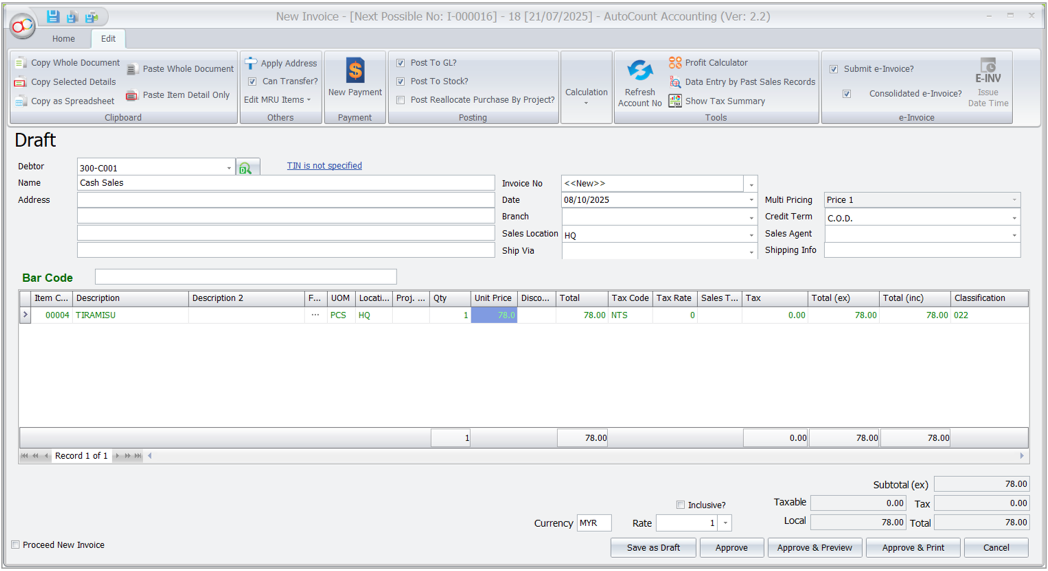
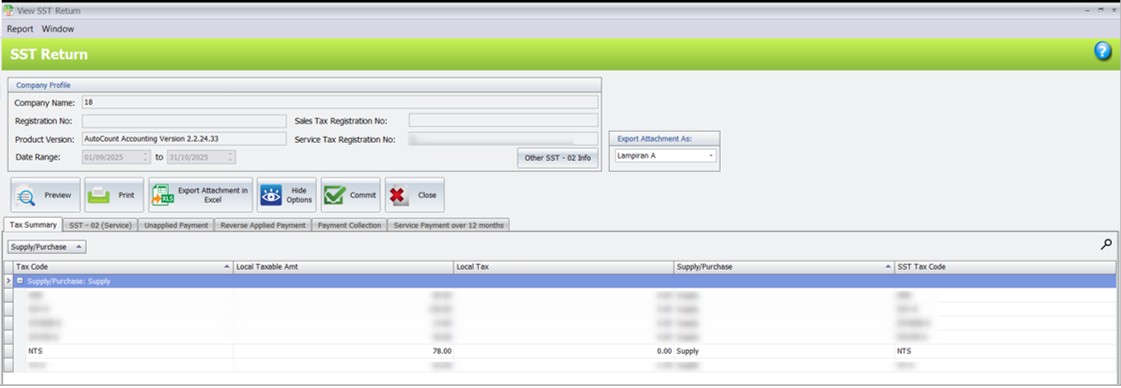
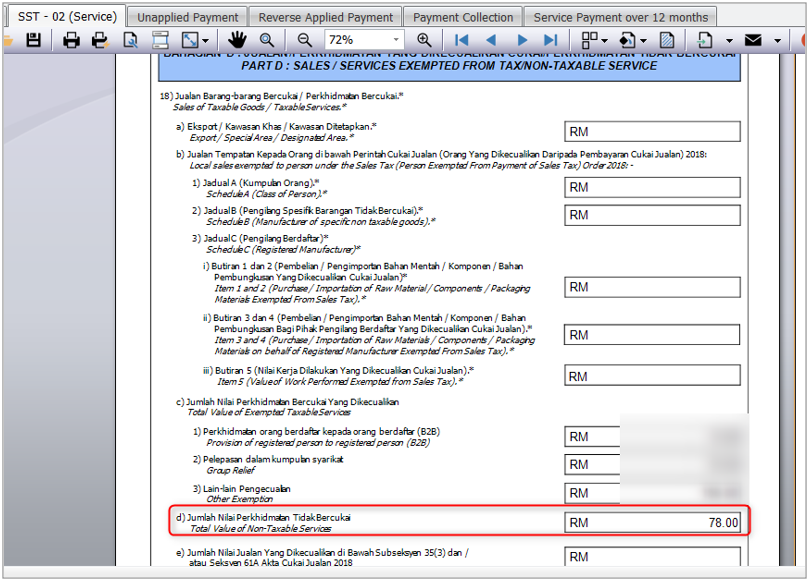
- Create a Sales Invoice using the NTS tax code. After payment is received, the taxable amount RM78 will appear in the SST Return.
- NTS transactions will be reflected under Column 18,Part D.
Source: AutoCount Wiki · By: Christine 260205, Lay Swan 260226
ZH
中文内容
问题
在新的 SST-02(服务税)下,系统如何处理免税服务(Tax-Exempted Services)和非应税服务(Non-Taxable Services)?
解答
- 免税服务税务代码(Tax Exempted Services Tax Code)
- ESV-6, ESV-8, ESVB2B-6, ESVB2B-8, ESVGR-6, ESVGR-8
- 非应税服务税务代码(Non-Taxable Services Tax Code)
- NTS
会计基础(付款基础)
服务税的会计基础为付款基础(Payment Basis),这意味着:
- 系统只会在发票被付款或 CN 冲销后,且在 12 个月内,才计入 SST 金额。
- 如果在 12 个月内未收到付款,系统将自动计算并确认 SST 税额。
免税服务(Tax Exempted Services):
示例场景 – ESV-6
- 前往 Tax(税务) > Tax Code Maintenance(税务代码维护) > Configure Malaysia SST(配置马来西亚 SST) > Output Tax(销项税)。选择 ESV-6,然后点击 Save(保存)。
- 前往 A/R(应收账款) > Debtor Maintenance(客户维护)。编辑该客户,进入 Tax Exemption(税务豁免)标签页,添加 Item Code(项目代码)并点击 Save(保存)。
- 前往 Sales(销售) > Invoice(发票)。选择 Debtor(客户)和 Item Code(项目代码)。系统将自动指定相关的税务代码。
- 点击 Approve & Preview(批准并预览)或 Save & Preview(保存并预览)。选择一个以 SST 开头的报表格式。
- Exempted Service Tax Amount(免税服务税金额)可在 SST Invoice Report(SST 发票报表)中查看。
- 发票付款完成后,通过 Tax(税务) > SST > SST Processor(SST 处理器)为该期间运行 SST Processor。
- 所应用的税务代码(ESV-6)将出现在 SST Return(SST 申报表)中。
免税金额将在 SST Return 中如下反映:
- Column 18,Part C, No.1
- ESVB2B-6, ESVB2B-8
- Column 18,Part C, No.2
- ESVGR-6, ESVGR-8
- Column 18,Part C, No.3
- ESV-6, ESV-8
非应税服务 [NTS]
- 重复上述步骤 1,并配置 NTS 税务代码。
- 使用 NTS 税务代码创建销售发票(Sales Invoice)。收到付款后,应税金额 RM78 将出现在 SST Return(SST 申报表)中。
- NTS 交易将反映在 Column 18,Part D 下。
来源:AutoCount 官方 Wiki · 作者:Christine 260205, Lay Swan 260226
MyTax Info
More practical e-Invoice updates